
This guide provides administrators and schedulers with instructions for managing the SAGE/2C9/People Pay leave integration.
The integration creates a seamless flow of leave data between the Skedulo and SAGE/2C9/People Pay platforms. Leave requests are initiated in Skedulo as Unavailability records, and approved leave is transferred to SAGE/2C9/People Pay during the timesheet approval process. SAGE/2C9/People Pay is the system of record for managing leave balances and processing leave for payroll.
Note: In some customer environments, this feature has been customised to meet specific business use cases.
Key Terminology
The following terms are essential for managing the leave integration.
| Term | Definition |
|---|---|
| Unavailability | A record in Skedulo indicating when a Resource is not available for work. If configured for paid leave types, an approved Unavailability record can trigger the creation of a Leave Event. |
| Skedulo Leave Event | A custom Skedulo object representing the hours of paid leave based on an approved Unavailability request that overlaps with scheduled work. |
| Payee Leave Event (PLE) | A record in SAGE/2C9/People Pay created from a Skedulo Leave Event upon timesheet approval, representing paid leave for a Resource. |
| Leave Calculation Method | A custom setting in the SAGE/2C9/People Pay integration package that determines how paid leave is calculated, based on either Scheduled Work or a Fixed number of hours. |
| Payee Leave Rules Object | An object within SAGE/2C9/People Pay where leave balances and rules are stored for each Payee (Resource). |
| Timesheet | A record representing a period of work or leave for a Resource. Approved timesheets in Skedulo trigger the transfer of associated data, including Leave Events, to SAGE/2C9/People Pay. |
| Timesheet Entry | A record in SAGE/2C9/People Pay representing a period of paid time, which can include approved leave. |
Leave Event Processing Workflow
New leave requests can be made by resources using the mobile application or by schedulers inside of our Skedulo consoles.
When an Unavailability record of a paid leave type is approved, the integration creates a Skedulo Leave Event for any scheduled work (Jobs, Shifts, or Activities) that overlaps with the unavailability period.
Resource leave submission and leave Balances
SAGE/2C9/People Pay is the system of record for managing employee leave balances. Resources can view their leave balances, as recorded in the SAGE/2C9/People Pay Payee Leave Rules Object, via a custom Leave Request form available in the Skedulo mobile app.
You can check out the user guide ‘Mobile App: Leave Requests with SAGE/2C9’ to learn more about the leave management mobile form.
Approving unavailability: Replacing unavailability with leave events
When an Unavailability record is approved, the system will find work assigned to the relevant resource during that period and create a leave record corresponding to each work record. The solution will also provide the ability to deallocate the Resource from assigned work by setting the status of any Job Allocation records to Deleted or deleting Activity and Resource Shifts. The ability to de-allocate Resources from work can be controlled by an org-wide feature flag.
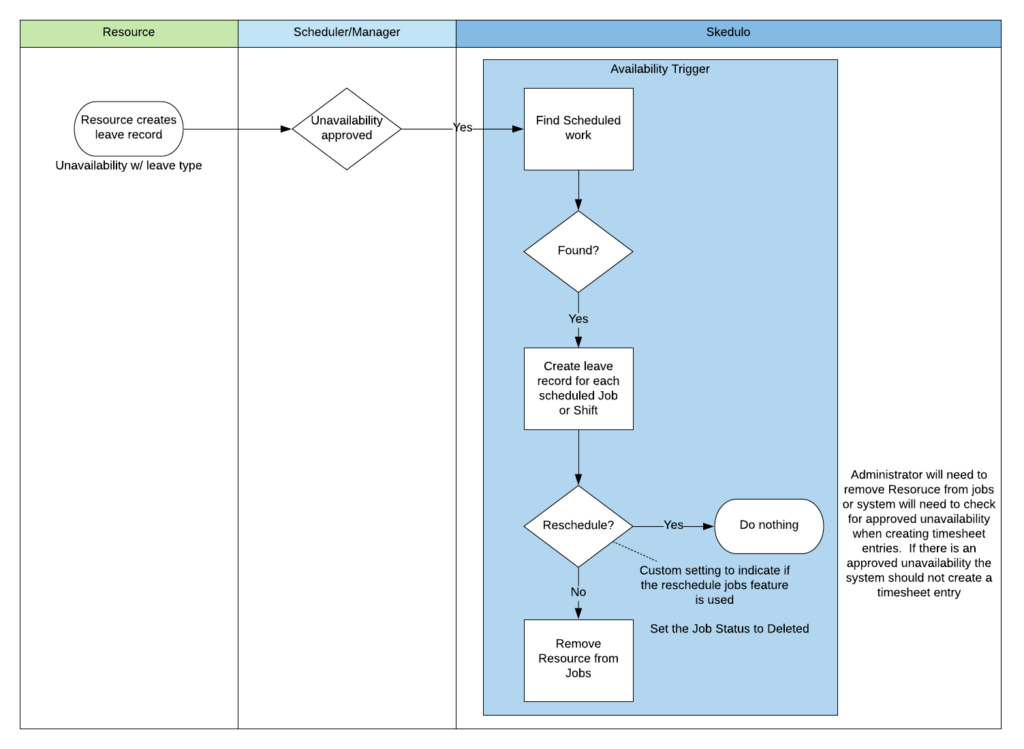
In order to support the scenario where a Resource applies for work at a future time when their Roster has not been applied to their schedule, the system will provide the ability to create Skedulo Leave Event records when work is assigned to a Resource. When a Job Allocation or Resource Shift is created the system will check if the Resource has any approved leave at the same time. If they do, a leave record will be created and the Resource deallocated from the work.

Processing leave in timesheets
When a Timesheet is approved, 2c9 Payroll Timesheet Entries will be created based on the Skedulo Leave Event records linked to the approved timesheet
Upon approval of the Skedulo Timesheet containing these Skedulo Leave Events, the integration validates the leave against the Payee Leave Rules within SAGE/2C9/People Pay and the custom metadata paid leave type setting. If a match is successful, the Skedulo Leave Event is sent to SAGE/2C9/People Pay, creating a corresponding Payee Leave Event.
The following key fields are mapped from the Skedulo Leave Event to the SAGE/2C9/People Pay Leave Event to ensure accurate data transfer:
- Approval Status: Set to
Approved. - Employee: Mapped from Resource.Payee.Employee or Resource.ContactID.
- End Date: Converted from the Skedulo Leave Event Finish field.
- Hours: The value is determined by the configured Leave Calculation Method.
- Payee: Mapped from Resource.Payee.
- Payee Leave Rule: Queried based on the Payee’s leave rule.
- Processing Status: Set to
New. - Reason: Mapped from the Skedulo Leave Event Type. This must match configured leave Unavailability types.
- Record Type: Set to
Leave Take. - Skip Manager Approval: Set to
Yes. - Start Date: Converted from the Skedulo Leave Event Start field.
- Timesheet: Linked to the SAGE/2C9/People Pay Timesheet record.
- Void: Set to
No.
Leave Calculation Methods
The SAGE/2C9/People Pay integration supports two methods for calculating paid leave based on approved Unavailability requests. The Leave Calculation Method custom setting controls which logic is applied.
Scheduled Work
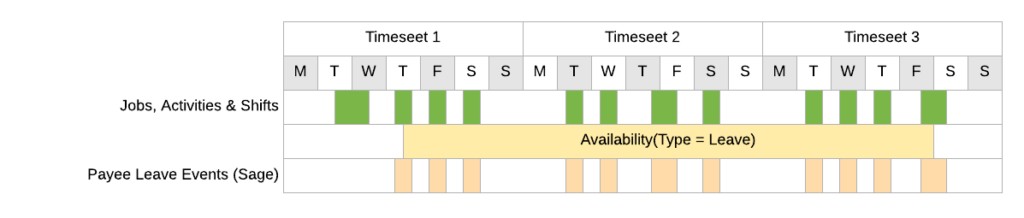
Part-Time workers who take leave are paid according to their standard rostered work pattern. In order to do this, 2c9 Payroll requires that Payee Leave Events are created that reflect the time that a Resource was scheduled to work and should be paid when on leave.
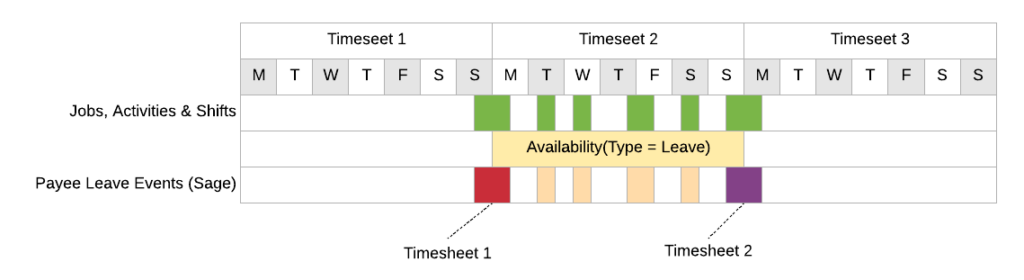
If a Job or Shift crosses over the start or end of a pay period, the resulting Leave Event should be linked to the pay period in which the Leave Event started. In the diagram below, the red leave event is linked to Timesheet 1 and the purple leave event is linked to Timesheet 2.
Fixed
With this method, a Resource is paid a fixed number of hours per day for the period covered by an approved Unavailability request. The Leave Event created represents the duration of the leave request, not the specific duration of any underlying scheduled work.
Configuration and Key Information
Administrators configure the leave integration via custom settings:
- Leave Calculation Method: Determines if the Scheduled Work or Fixed leave logic is applied.
- Timesheet Availability Leave Types: A comma-separated list specifying the Unavailability types that will trigger the creation of Leave Events.
- Paid Activities: Defines the Skedulo Activity types that will result in a Timesheet Entry being created in SAGE/2C9/People Pay.
- Enable Cost Centre on Leave Event: If enabled, the Cost Centre associated with a Job being replaced by leave will be applied to the Leave Event.
- Exclude Sleepover Leave Time: Excludes the inactive sleepover component from Leave Events.
- Enable LE Project Code: If a Project Code is attached to a Job being replaced by a Leave Event, this setting ensures the Project Code is included with the Leave Event.
Permissions and Forms
- Specific permission sets are required for users managing leave:
- Sage Integration Resource Permission Set: Required for Resources using the mobile form for leave requests.
- Sage Integration Scheduler Permission Set: Required for Schedulers approving timesheets.
- A custom Leave Request form designed for the SAGE/2C9/People Pay integration must be installed, as the standard Skedulo mobile leave form is disabled.
Known Limitations
- Leave Events created through this integration are not visible in the following consoles:
- Resource Roster Console
- Roster Management Console
- Healthcare Scheduling Console
- Timesheet Console
- The amended scheduled hours for Leave Events are not visible in these consoles.