
This user guide provides information regarding the synchronization of employee data between the SAGE/2C9/People Pay solution and Skedulo. This process ensures that employee information is consistent across systems and facilitates payroll processing.
The Payee to Resource synchronization process ensures that employee data, mastered in SAGE/2C9/People Pay, is accurately reflected in Skedulo as Resource records. This synchronization is critical for:
- Maintaining consistent employee information across both systems without manual intervention.
- Automating the creation of basic Resource records when new Payees are added in SAGE/2C9/People Pay.
- Enabling subsequent payroll processes and job costing calculations which rely on accurate Resource data linked to Payees and Assignments.
Terminology
The following terms are used in the context of Payee to Resource synchronization:
| Term | Description |
|---|---|
| Payee | A person who is to be paid by SAGE/2C9/People Pay. SAGE/2C9/People Pay is the master system for Payee details. |
| Resource | A person who acts as a support worker for the organization, using the Skedulo Mobile App to perform assigned work. Resource records are created in Skedulo. |
| Assignment | A shell object within SAGE/2C9/People Pay that is key to ensuring support workers are configured for the necessary payment rates. An Assignment is created for a Resource. |
| Operations/ Scheduler | A person who is responsible for onboarding employees, scheduling jobs, activities, and shifts using the Skedulo Salesforce or Web App. |
| Administrator | A user responsible for the configuration and maintenance of the integration settings and data within the system. |
Synchronization Process Overview
SAGE/2C9/People Pay acts as the master data source for employee details. When a Payee record is created or updated in SAGE/2C9/People Pay, the integration facilitates the creation or update of the corresponding Resource record in Skedulo.
The integration includes a backward integrity check where the unique Salesforce ID of the Skedulo Resource is populated on the corresponding Payee record to maintain a persistent link between the two systems.
Configuration and Manual Data Entry
While the integration automates the transfer of most Payee data, certain critical fields require manual population by Administrators or Operations/Schedulers. This manual step is essential to ensure correct payroll processing and Assignment creation.
Administrative Configuration: Determining Which Payees Become Resources
The integration provides the flexibility to control which Payee records in SAGE/2C9/People Pay are created as Resource records in Skedulo. This is primarily used to exclude staff, such as office workers, who do not perform scheduled jobs.
- Navigate to the specific Payee record within the SAGE/2C9/People Pay system.
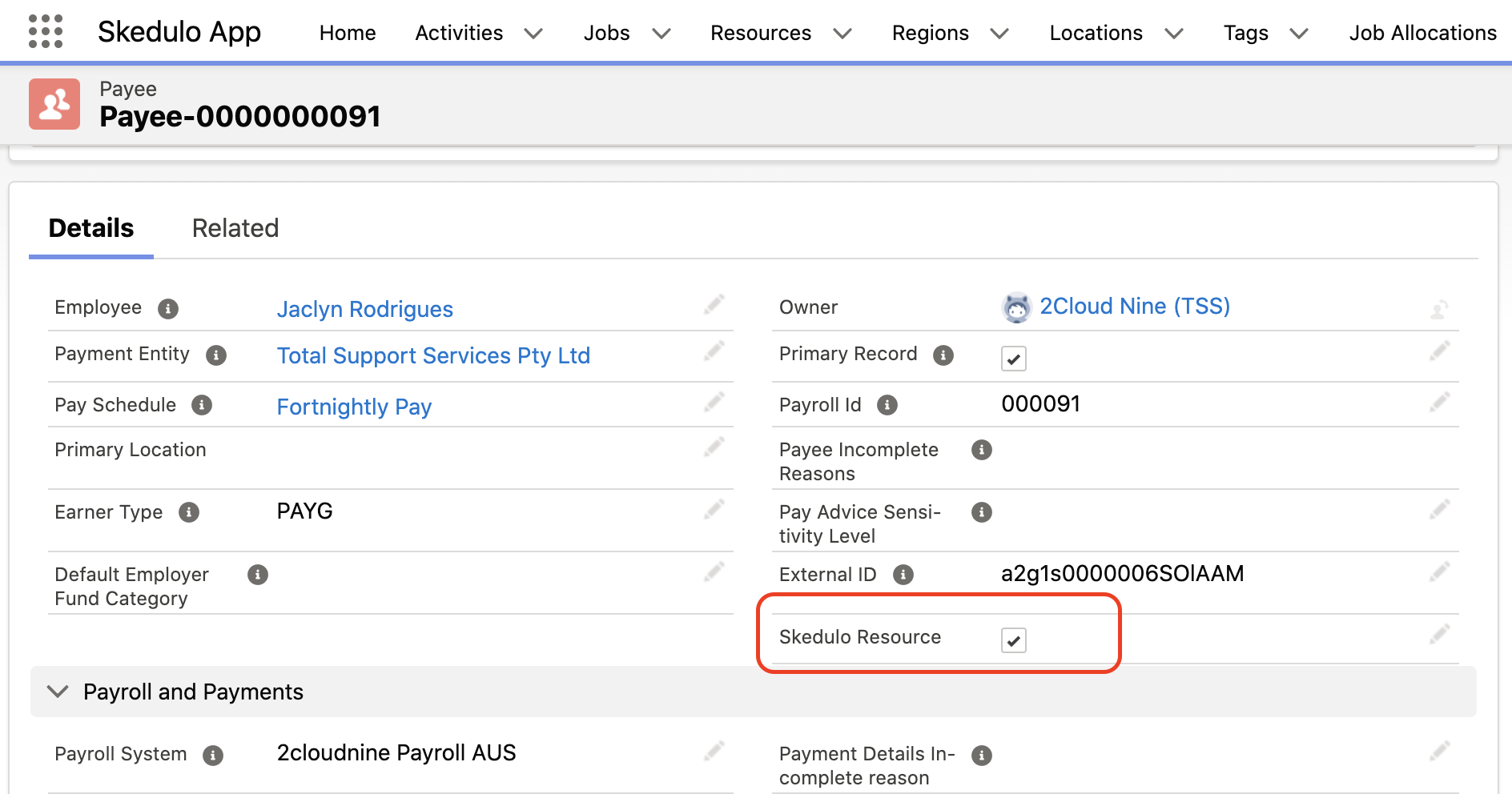
- Manage the Skedulo Resource checkbox:
- To create a corresponding Resource record in Skedulo, ensure the Skedulo Resource checkbox is checked. This action triggers the synchronization process.
- If the checkbox is unchecked, a Resource record for that Payee will not be created via the integration.
Important: For some customer environments data populated against the resource record can be sourced from the Payee and Contract record.
Required Manual Data Entry on Resource Records
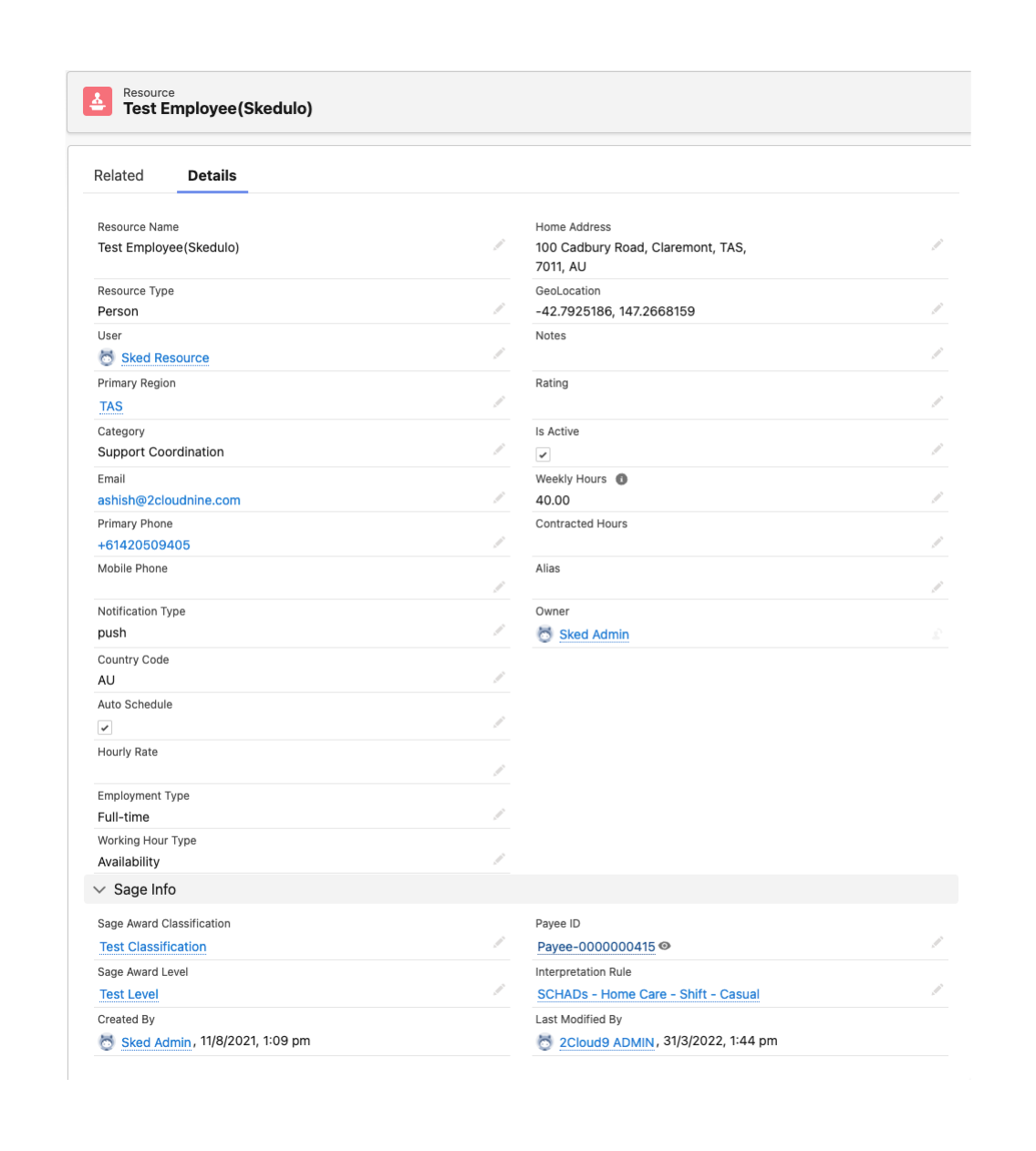
After a Resource record is created via synchronization, Administrators or the operations team must manually populate specific mandatory fields on the Resource record in Skedulo. These fields are vital for creating the Assignment record in SAGE/2C9/People Pay, which determines how the Resource is paid.
The following fields on the Resource record require manual entry:
- Primary Region
- A Salesforce user assignment (for mobile resources)
- Category
- Sage Award Classification
- Sage Award Level
- Interpretation Rule
Important: The Sage Award Classification, Sage Award Level, and Interpretation Rule fields are critical for Assignment creation. Accurate data in these fields is required to send correct timesheet data to SAGE/2C9/People Pay.
It is a best practice to create a dedicated ‘View’ in your Salesforce environment for Administrators and Operations/ Schedulers to easily identify and manage Resource records that require these updates.
Best practices
To ensure the Payee to Resource synchronization functions correctly and that Resource records are prepared for payroll processing, follow these steps.
1. For Administrators (Controlling Sync)
- Confirm that the Skedulo Resource checkbox on Payee records in SAGE/2C9/People Pay is correctly set to control which Payees are created as Skedulo Resources.
2. For Operations/ Schedulers
- Utilize a dedicated ‘View’ in Salesforce to identify newly created or existing Resource records that require updates.
- Manually populate the mandatory fields on the Resource record, including Primary Region, Salesforce user, Category, Sage Award Classification, Sage Award Level, and Interpretation Rule.
- Pay particular attention to the accuracy of the Sage Award Classification, Sage Award Level, and Interpretation Rule fields, as they are critical for creating Assignments and ensuring correct pay rates.